
Productivity & Personal Tools
Whiiteroom
Distraction-free productivity workspace with whitelist and blacklist modes for Windows and Android
Whiiteroom is a focus app that transforms your device into a distraction-free workspace using whitelist or blacklist modes, with OS-level enforcement and
Overview
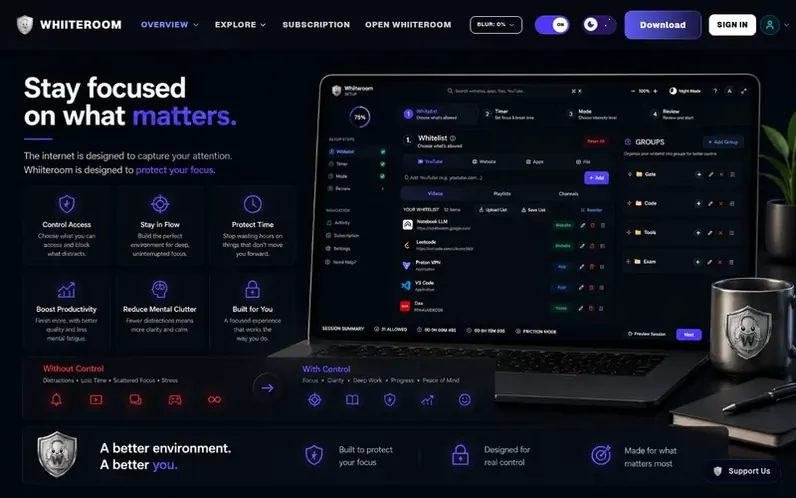
A look at whiiteroom.com
Whiiteroom is a productivity app that transforms your computer or phone into a distraction-free workspace designed for focused work. It offers two blocking modes: Whitelist Mode, where you allow only specific apps, websites, files, and YouTube resources while everything else is blocked; and Blacklist Mode, where you block only known distractions while keeping everything else accessible. Both modes enforce session limits at the operating system level with restart persistence, preventing easy bypasses. The app includes a built-in distraction-free YouTube browser that removes recommendations, comments, and autoplay features. Sessions support flexible focus modes (Relax, Friction, and Strict), scheduled breaks, and workspace profiles that can be saved and reused. All features are currently free during the launch period.
Feature notes
- OS-level enforcement with restart persistence
- Distraction-free YouTube browser with filtering
- Session and scheduled break timers
- Auto-start scheduler for recurring focus sessions
- Private distraction tracking and focus analytics
- Workspace profiles to save and reuse settings
- Pre-session account sign-in for seamless authentication
Pricing
Pricing model: Freemium
Compare and explore
FAQ
- What is Whiiteroom?
- Whiiteroom is a productivity app with a built-in browser that transforms your computer or phone into a distraction-free workspace. It supports Whitelist Mode (allow only approved apps and websites) and Blacklist Mode (block only your distractions), both with the same session timer, break windows, and focus options.
- How does Whiiteroom differ from traditional website blockers?
- Whiiteroom offers both whitelist and blacklist philosophies in one app. Whitelist Mode blocks everything by default and lets you approve only what you need, while Blacklist Mode keeps everything accessible and lets you block only known distractions. It also adds OS-level process enforcement, a built-in distraction-free YouTube browser, and crash-resilient session locking.
- Does Whiiteroom work on Windows and Android?
- Yes, Whiiteroom is available as a native desktop application for Windows 10 and 11, and as an APK mobile application for Android devices.
- Can I whitelist only part of a website?
- Yes, you can allow an entire website or only specific webpages depending on what you need for your task.
- What happens during scheduled breaks?
- During a scheduled break, restrictions are temporarily lifted so you can use your device normally. When the break ends, Whiiteroom automatically restores your focus session and continues with the remaining time.
Leave a review for Whiiteroom
No reviews of Whiiteroom yet. Run the first inspection.
Reviews are free and are never paid for. Open the reviews
Reviews and notes · Change log · Share the profile · Maker of this product? Claim the profile · Report a fault
Whiiteroom has a free listing. The owner can unlock the full profile with a paid launch for $5:
- Founder story (locked)
- Milestones (locked)
- Demo video (locked)
- Dofollow website link (locked)
Comparable tools
- TimeLoopDR 14 · 0 community votes
- CallFirstDR 3 · 0 community votes
- Liner NotesDR 1 · 0 community votes
- HeyDockDR 6 · 0 community votes



