Productivity & Personal Tools
HeyDock
A Mac Dock replacement that reshapes itself around what you're doing
A Mac Dock replacement with task-based modes, focus gates, held notifications and on-device AI. Pay once, no subscription.
Overview
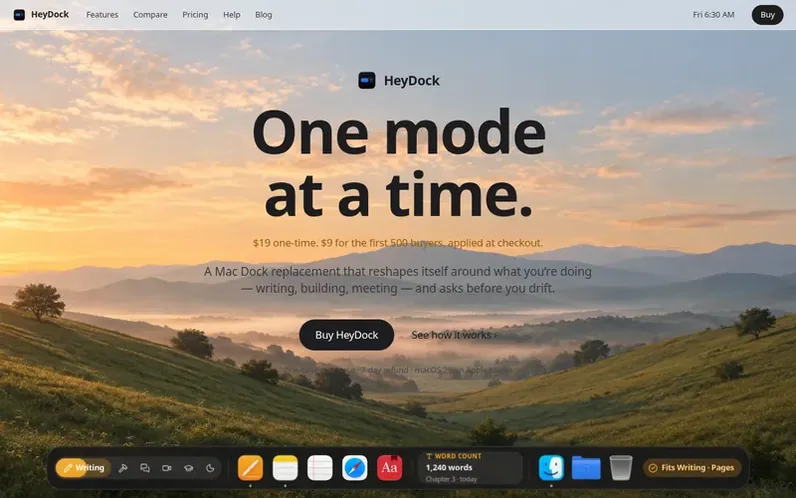
A look at heydock.app
HeyDock is a Mac Dock replacement that changes with what you're doing. Each mode brings its own apps, sites and widgets, so the dock reshapes around writing, building, meetings, study and rest. On-device AI reads each window and site to judge whether it fits your current mode. During a Focus session, if you try to open something that doesn't fit, HeyDock asks first—staying is one click, but switching involves a short wait to make drifting a conscious choice. Notifications from apps outside your mode are held and delivered as one digest when you switch. When you leave a mode, HeyDock saves where you were and offers to restore it when you come back.
The app runs on Apple's on-device model so your activity stays on your Mac—there is no HeyDock server. HeyDock can run alongside Apple's Dock or replace it entirely, keeping Downloads, Trash, badges, minimized windows and previews. It includes 30 live widgets you can add to a mode or the desktop, twelve themes with four kinds of glass, and Claude Code integration that pings you when sessions finish.
HeyDock is built for macOS 26 or later on Macs with Apple silicon. It costs $19 for one Mac (Solo) or $29 for two Macs (Duo), paid once with every 1.x update included. Founding members get $10 off for the first 500 buyers. There's no free trial but a 7-day refund if it's not for you.
Feature notes
- Task-based modes with custom apps, sites and widgets per mode
- Stay-or-switch gate during Focus with friction-based pauses
- On-device AI that judges whether apps and sites fit your current mode
- Held notifications delivered as one digest when you switch modes
- Session restore showing where you left off with notes on your work
- 30 live widgets customizable per mode or desktop
- Full macOS Dock replacement including Downloads, Trash and badges
- Claude Code integration with cards when sessions finish
- Browser extension for Chrome, Brave, Arc and Edge to gate sites
- Twelve themes with four kinds of glass and mode wallpapers
Pricing
Solo: $19 one-time for one Mac (was $19, now $9 with founding discount for first 500 buyers). Duo: $29 one-time for two Macs (was $29, now $19 with founding discount for first 500 buyers). Pro+ planned for v2 at $4 per month or $36 per year as optional add-on. Every 1.x update included. US dollars b
Compare and explore
FAQ
- What is HeyDock?
- HeyDock is a Mac Dock replacement and focus app where each mode has its own apps, sites and widgets, so your dock changes when you move between writing, building, meetings, study and rest.
- Does HeyDock replace the Mac Dock?
- It can. You can run it beside the Dock, or hide the Dock and let HeyDock take over—Downloads, Trash, badges, minimized windows and window previews all come along.
- How much does HeyDock cost?
- Solo costs $19 for one Mac and Duo costs $29 for two Macs, paid once in US dollars before tax. The founding discount takes $10 off either plan for the first 500 buyers, applied automatically at checkout. Every 1.x update is included.
- Is my data private?
- Yes. Intent detection runs on Apple's on-device model, so what you're working on never leaves your Mac.
- Is there a free trial?
- No—there's a 7-day refund instead. If HeyDock isn't for you, email support within a week and you get your money back.
Leave a review for HeyDock
No reviews of HeyDock yet. Run the first inspection.
Reviews are free and are never paid for. Open the reviews
Reviews and notes · Change log · Share the profile · Maker of this product? Claim the profile · Report a fault
HeyDock has a free listing. The owner can unlock the full profile with a paid launch for $5:
- Founder story (locked)
- Milestones (locked)
- Demo video (locked)
- Dofollow website link (locked)
Comparable tools
- TimeLoopDR 14 · 0 community votes
- CallFirstDR 3 · 0 community votes
- Liner NotesDR 1 · 0 community votes
- MemspireDR 0 · 0 community votes