Email & notification APIs
TopDock
Unified inbox for Windows with Gmail, Outlook and X in one slim bar
A slim bar at the top of your Windows screen with tiles for Gmail, Outlook, X and todos, showing unread badges and allowing you to read and reply without
Overview
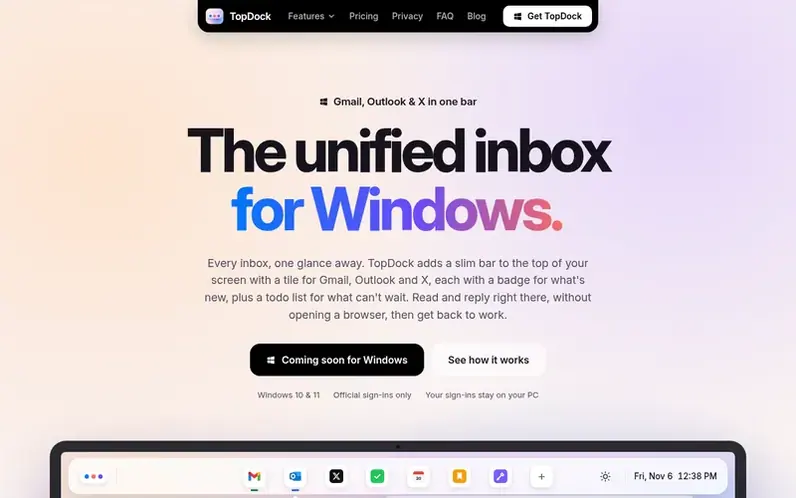
A look at topdock.app
TopDock is a unified inbox app for Windows 10 and 11 that adds a slim bar to the top of your screen. Each inbox you connect—Gmail, Outlook, or X—appears as a tile with a badge showing new messages. Click a tile to open a panel where you can read, reply, archive emails or create posts without opening a browser tab.
The app includes a Todos tile to convert messages into tasks with projects and deadlines, calendar tiles for Google Calendar or Outlook to see your next meeting, and a Tools tile for converting images and PDFs. All your account sign-ins are stored locally in Windows Credential Manager, and TopDock runs without a server or account system. The app never sends or posts anything automatically—you must press Send for every message.
Feature notes
- Read and reply to Gmail and Outlook without opening a browser
- Connect multiple Gmail and Outlook inboxes as separate or combined tiles
- View X mentions, likes, reposts and new followers with profile pictures
- Convert emails and mentions into todos with projects, colours and deadlines
- Convert images to PNG, JPG or WebP; crop, resize and rotate pictures
- Hide or redact parts of images before sending scans
- Merge and split PDFs
Pricing
Pricing model: Free trial
Free 7-day trial, then €9.99/month or €79/year. Founding members: €29/year (members 1–20), €39/year (21–50), €49/year (51–100). One licence covers 3 PCs. 14-day money-back guarantee.
Compare and explore
FAQ
- How much does TopDock cost?
- Try everything free for 7 days with no card required. After the trial, it costs €9.99 per month or €79 per year. The first 100 founding members pay less: €29 per year for members 1–20, €39 for members 21–50, and €49 for members 51–100, keeping that price as long as they stay subscribed. One licence covers 3 PCs.
- Which accounts and services does TopDock work with?
- Gmail and Outlook (as many inboxes as you want), X, Google Calendar and Outlook calendars. You can also pin a single conversation as its own tile and create todos within the app.
- Where are my account sign-ins stored?
- Your sign-in tokens are stored in Windows Credential Manager on your own PC. TopDock has no account system and no server, so there's nowhere else for them to go.
- Will TopDock slow down my PC?
- No. TopDock is a small bar that checks for new messages every few minutes and stays out of the way the rest of the time.
- Can I turn emails and mentions into todos?
- Yes. Press T on any email or X mention to turn it into a todo that links back to the message. You can group todos into projects with colours and add dates or times; todos are saved on your PC only.
Leave a review for TopDock
No reviews of TopDock yet. Run the first inspection.
Reviews are free and are never paid for. Open the reviews
Reviews and notes · Change log · Share the profile · Maker of this product? Claim the profile · Report a fault
TopDock has a free listing. The owner can unlock the full profile with a paid launch for $5:
- Founder story (locked)
- Milestones (locked)
- Demo video (locked)
- Dofollow website link (locked)
Comparable tools
- DoveDR 20 · 0 community votes
- Cendro by OakboxDR 0 · 0 community votes
- SentlyDR 0 · 0 community votes
- agdir.emailDR 0 · 0 community votes