
Productivity & Personal Tools
Local Media Administrator
Browse, rediscover, and organize your local video collection without uploading to the cloud
A Windows desktop app for browsing, organizing, and playing personal video libraries stored locally on your computer.
Overview
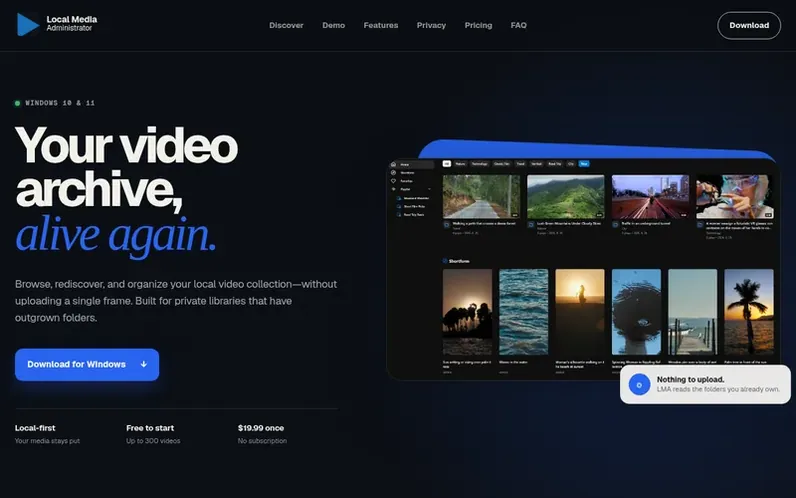
A look at local-media-administrator.com
Local Media Administrator is a Windows desktop application that lets you browse, organize, and play personal video collections without uploading files to the cloud. You register folders containing your local videos, and LMA builds a searchable index with a visual interface accessible through your default browser. The app provides features for rediscovering footage through a home feed, organizing with tags and playlists, and inspecting video frames with precise playback controls. All your media stays in its original folders and all metadata is stored locally on your computer.
Feature notes
- Home feed for browsing and rediscovering footage
- Custom tags and playlists for organizing videos
- Frame capture and timestamped stamps
- Local backup functionality
- Seven interface languages supported
- Shortform browsing mode for vertical viewing
Pricing
Lite edition is free with 300 video limit. Pro is $19.99 one-time purchase for unlimited videos, tags, and playlists.
Compare and explore
- Alternatives to Local Media Administrator
- Many Displays vs Local Media Administrator
- StampName vs Local Media Administrator
- HARDER vs Local Media Administrator
- Axsuro vs Local Media Administrator
- reverscan vs Local Media Administrator
- Farha vs Local Media Administrator
- More in Productivity & Personal Tools
FAQ
- Does LMA upload my videos?
- No. Registered media is read from its original folders and is not uploaded to a cloud library. Browsing, search, playback, and organization run against LMA's loopback-only local server.
- Which video format is supported?
- LMA currently indexes MPEG-4 Part 14 container files only. Playback depends on the codecs supported by your installed browser, and LMA does not transcode media.
- Is an internet connection required?
- The media library itself is local, and Lite needs no activation. Pro requires an internet connection for initial activation and one final verification approximately one week later. After that, Pro can be used offline.
- Is Pro a subscription?
- No. Pro is a one-time $19.99 perpetual upgrade with no recurring subscription. The license does not expire.
Leave a review for Local Media Administrator
No reviews of Local Media Administrator yet. Run the first inspection.
Reviews are free and are never paid for. Open the reviews
Reviews and notes · Change log · Share the profile · Maker of this product? Claim the profile · Report a fault
Local Media Administrator has a free listing. The owner can unlock the full profile with a paid launch for $5:
- Founder story (locked)
- Milestones (locked)
- Demo video (locked)
- Dofollow website link (locked)
Comparable tools
- TimeLoopDR 14 · 0 community votes
- CallFirstDR 3 · 0 community votes
- Liner NotesDR 1 · 0 community votes
- HeyDockDR 6 · 0 community votes



