Productivity & Personal Tools
InStock Kitchen
Track your pantry, fridge and freezer, find recipes using ingredients you have, and organize your grocery list.
A pantry inventory and recipe app that helps you track food, discover recipes from what you have, and plan shopping lists.
Overview
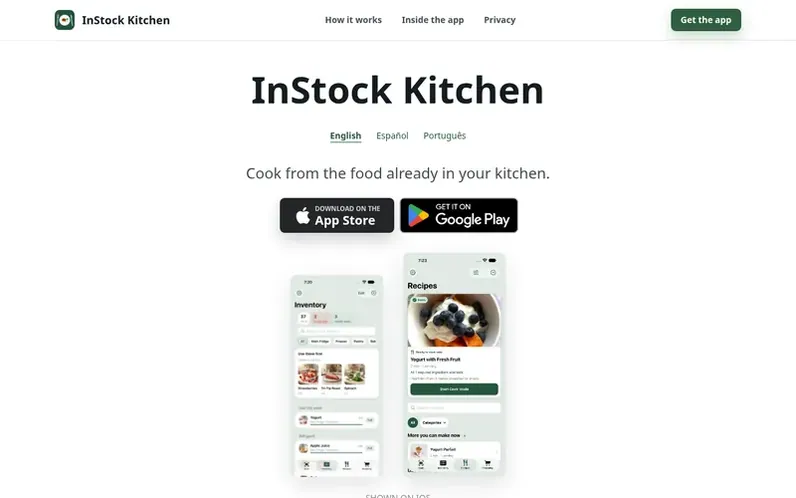
A look at instockkitchen.com
InStock Kitchen is a mobile app for iPhone, iPad and Android that helps you manage your kitchen inventory and reduce food waste. You can scan barcodes or manually enter items to track what's in your fridge, freezer and pantry. The app then matches your available ingredients to recipes you can make right now, prioritizing items that need to be used soon. When you find a recipe you want to make but are missing ingredients, the app generates an aisle-organized shopping list. A weekly meal planning feature lets you bring breakfast, lunch and dinner together in one plan.
Feature notes
- Barcode scanning and manual item entry for inventory tracking
- Track fridge, freezer and pantry with freshness estimates
- Recipe discovery based on available ingredients
- Aisle-organized shopping lists for missing ingredients
- Weekly meal planning for breakfast, lunch and dinner
- Privacy Mode with on-device processing
- Import your own recipes with InStock Pro
Pricing
Pricing model: Freemium
Core features free; InStock Pro available as optional one-time purchase (exact prices shown in app)
Compare and explore
FAQ
- Is it a subscription?
- No. InStock Kitchen offers core features for free, with InStock Pro available as an optional one-time purchase. Exact prices and features are shown in the app.
- Do I have to scan every single item?
- Not at all. You can scan barcodes, search manually, or add just the key ingredients you want to use up. The app works well whether you track everything or just the essentials.
- Is it available for Android?
- Yes. InStock Kitchen is available for both iOS (iPhone/iPad) and Android devices, downloadable from the App Store or Google Play.
- What happens if InStock Pro doesn't show up on a new device?
- Use Restore in the app while signed in to the same Apple Account or Google account you bought it with. Refunds are handled by the store you bought from: Apple or Google Play.
- What data does InStock Kitchen store and how can I delete it?
- Questions about your data or requests to delete records held on the server should be emailed to InStock Kitchen. See the Privacy Policy for full details.
Leave a review for InStock Kitchen
No reviews of InStock Kitchen yet. Run the first inspection.
Reviews are free and are never paid for. Open the reviews
Reviews and notes · Change log · Share the profile · Maker of this product? Claim the profile · Report a fault
InStock Kitchen has a free listing. The owner can unlock the full profile with a paid launch for $5:
- Founder story (locked)
- Milestones (locked)
- Demo video (locked)
- Dofollow website link (locked)
Comparable tools
- TodoalDR 6 · 2 community votes
- WhiiteroomDR 3 · 1 community vote
- Justduedate7DR 0 · 0 community votes
- PixphDR 5 · 0 community votes