
Productivity & Personal Tools
Forgot
Team vacation calendar for engineering managers
A team calendar for engineering managers to track vacations, on-call shifts, project work and release dates, with notifications in Slack, Teams, email and
Overview
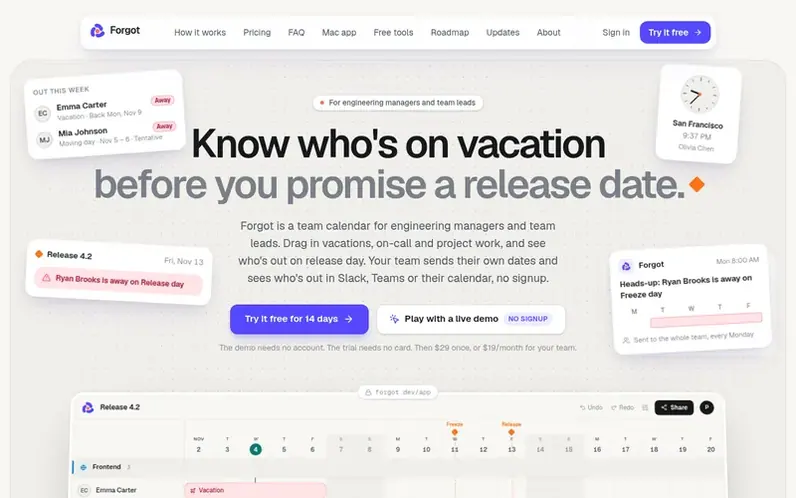
A look at forgot.dev
Forgot is a team calendar for engineering managers and team leads to see who's on vacation before promising a release date. You drag in vacations, on-call and project work, and mark release dates. Your team sends their own dates through a link with no signup required, and notifications appear in Slack, Teams, Google Calendar, Outlook and email.
The calendar shows who's out on release day with automatic warnings and flags conflicts. Co-managers can edit together while everyone else views for free through a link, Slack post, Teams channel, calendar feed or weekly email. It includes a Mac menu bar app and Chrome extension.
Forgot is designed for teams that currently use spreadsheets or HR leave tools. It handles time off, on-call schedules, project work and release dates on one calendar, never charging per person.
Feature notes
- Drag-and-drop calendar interface for vacations, on-call, and project work
- Team members send dates through a link, no signup required
- Slack and Microsoft Teams integration
- Google Calendar and Outlook calendar feed
- Import from spreadsheet with code support
- Co-editor collaboration across multiple calendars
Pricing
Pricing model: Freemium
Solo: $9 once for a lifetime license, one editor. Team: $19/month (founding price for first 20 teams, locked in), up to 10 editors. Free 14-day trial, no card required.
Compare and explore
FAQ
- Does my team need to sign up or install anything?
- Only editors sign in (you and any co-managers you invite on Team). Your team sends their dates through one link, picks their name and marks their days with no account needed. Everyone else views the calendar for free through a link, Slack, Teams, email or calendar feed.
- Can multiple managers edit the same calendar?
- Yes. On the Team plan, you can invite up to 9 other editors by email. Each calendar has its own editors, and one Team plan covers all your calendars. Their changes show up on yours in real time.
- What happens to my data if I cancel the Team plan?
- You keep everything you paid for until the end of the month or year. After that, co-editors become viewers. If you own a lifetime license you keep editing; otherwise your calendars become view-only with nothing deleted. Share links and calendar feeds keep working.
- Does Forgot integrate with my existing tools?
- Yes. Forgot sends who's out to Slack, Microsoft Teams, Google Calendar, Outlook and Apple Calendar. You can embed the live calendar in Notion or Confluence, export to PNG or PDF, or share a read-only link. You can also import from Excel, CSV or Google Sheets.
Leave a review for Forgot
No reviews of Forgot yet. Run the first inspection.
Reviews are free and are never paid for. Open the reviews
Reviews and notes · Change log · Share the profile · Maker of this product? Claim the profile · Report a fault
Forgot has a free listing. The owner can unlock the full profile with a paid launch for $5:
- Founder story (locked)
- Milestones (locked)
- Demo video (locked)
- Dofollow website link (locked)
Comparable tools
- TimeLoopDR 14 · 0 community votes
- CallFirstDR 3 · 0 community votes
- Liner NotesDR 1 · 0 community votes
- HeyDockDR 6 · 0 community votes



