Testing & QA
BugScreen
Mobile bug reporting SDK that turns screenshots into fixable tickets with logs and device context
In-app bug reporting SDK for iOS, Android and React Native that captures screenshots, application logs and device context, sending reports directly to Jira
Overview
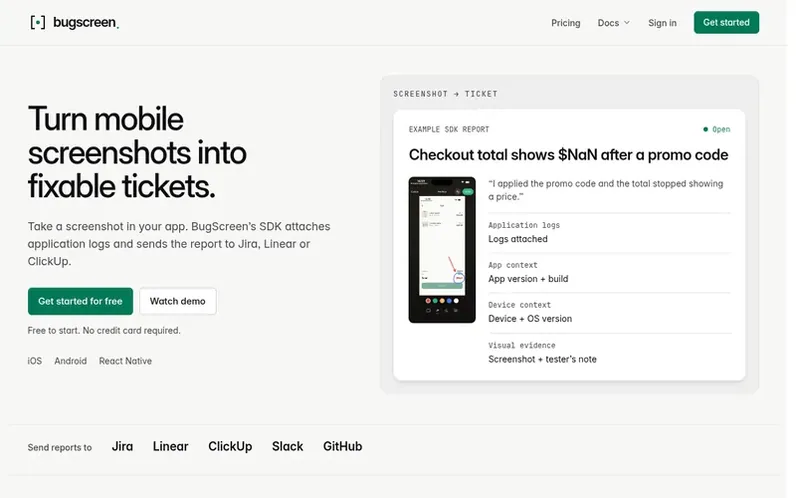
A look at bugscreen.app
BugScreen is an SDK for mobile QA testing that simplifies bug reporting. When a tester takes a screenshot in an app, BugScreen opens a reporter where they can describe the issue. The SDK automatically attaches application logs, device details, build information and OS version, then files a complete report to Jira, Linear, ClickUp or other trackers.
The platform addresses a common problem in mobile QA workflows: details like device type, OS version and logs are often lost between when a bug is spotted and when it becomes a ticket. BugScreen closes that gap by keeping all context together in one structured report.
It offers two integration paths: native SDKs for iOS and Android with a React Native wrapper for in-app reporting, or a standalone companion app that lets testers report bugs without code changes. Reports can include annotated screenshots with sensitive details redacted before upload.
Feature notes
- Screenshot capture with automatic reporter opening
- Application logs automatically attached to reports
- Screenshot annotation and sensitive data redaction
- No SDK required companion app option
- Private Report Inbox for storing reports
- React Native SDK support
- Unlimited testers on all plans
- AWS data processing in London
Pricing
Pricing model: Freemium
Free plan: $0/month for 1 app, 50 reports/month, 1 integration per app, 1 admin seat. Pro plan: $29/month for 3 apps, 500 reports/month, 2 integrations per app, up to 5 admin seats. Team plan: $89/month for 10 apps, 5,000 reports/month, unlimited integrations per app, up to 25 admin seats. Enterpris
Compare and explore
FAQ
- What is BugScreen?
- BugScreen is an in-app bug-reporting SDK for iOS, Android and React Native that turns human-reported bugs into useful tickets. A screenshot opens the reporter and sends the tester's description, application logs and technical context to Jira, Linear or ClickUp.
- Why not just paste a screenshot into Slack?
- A screenshot in Slack leaves engineers asking for logs, build and device details. The BugScreen SDK attaches that context and files the report in your tracker.
- Which platforms does BugScreen support?
- SDKs for iOS, Android and React Native. The companion app also lets testers report without integrating an SDK.
- Do I have to change my app to use it?
- Use the companion app without code changes. Integrate the SDK for in-app reporting, application logs and build context.
- How do you count bug reports?
- Each report that passes validation and is accepted for processing counts as one. Reports rejected for invalid data or because the monthly limit is already reached do not count.
Leave a review for BugScreen
No reviews of BugScreen yet. Run the first inspection.
Reviews are free and are never paid for. Open the reviews
Reviews and notes · Change log · Share the profile · Maker of this product? Claim the profile · Report a fault
BugScreen has a free listing. The owner can unlock the full profile with a paid launch for $5:
- Founder story (locked)
- Milestones (locked)
- Demo video (locked)
- Dofollow website link (locked)
Comparable tools
- BugHerdDR 73 · 0 community votes
- Idempotency Harness CheckerDR 36 · 0 community votes
- CheckYourDisplayDR 1 · 0 community votes
- Quality.NotedDR 0 · 0 community votes