
Productivity & Personal Tools
BucketDesk
Secure S3 storage for human beings
A file workspace that turns Amazon S3 buckets into a secure collaboration space, allowing teams to browse, preview, and share files without needing AWS console
Overview
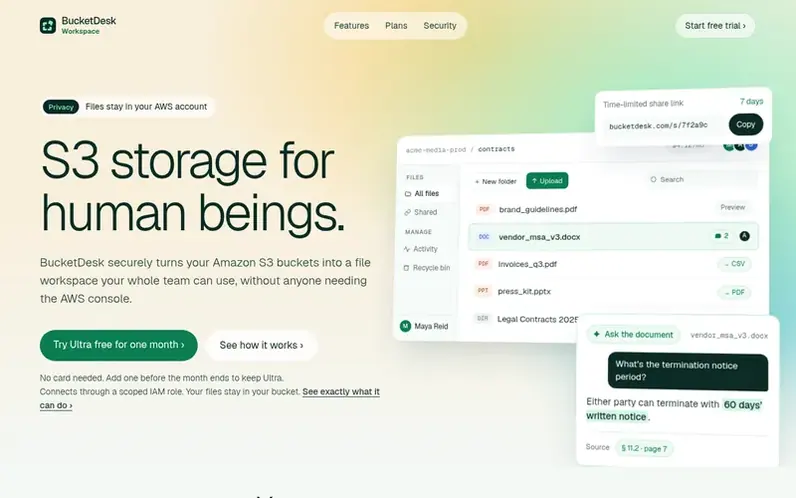
A look at bucketdesk.com
BucketDesk is a file workspace for Amazon S3 buckets your business already owns. It allows teams to browse, preview, and share files stored in S3 without requiring AWS console access or sharing credentials. The platform connects through a scoped IAM role, keeping files in your own AWS account.
Key capabilities include in-browser preview of PDFs, images, Office documents, audio and video; the ability to ask questions about documents and receive answers with page citations; inspection of zip archives before extraction; and sharing files through expiring links that can be revoked. Teams can upload files, restore objects from cold storage, and manage access through workspace roles instead of individual AWS accounts.
The product is designed around the principle of bringing the workspace to the data: preserving customer control, minimizing unnecessary data movement, and explaining clearly how files are handled. It is built on AWS primitives like IAM roles, STS AssumeRole, and CloudFormation, requiring no new infrastructure to operate.
Feature notes
- Browse and search S3 buckets by prefix or name
- In-browser preview of PDFs, images, Office documents, audio and video
- Inspect zip files before extraction without downloading
- Share files with expiring, revocable links
- Upload files directly to S3 and restore from Glacier
- Recycle bin to undo deletes for 30 days
- S3 Savings tool to find and apply storage cost reductions
- Workspace roles for team members instead of AWS credentials
- Edit Office files and save directly to S3
Pricing
Pricing model: Freemium
Compare and explore
FAQ
- Do you charge for storage?
- Your files stay in your S3 buckets and AWS bills you for storage directly, as it does today.
- What is an allowance?
- A set number of free uses each month of a feature your plan does not include, such as uploads or AI questions. BucketDesk shows how many are left next to the button that uses them, and they start again on the 1st.
- Who counts as a teammate?
- Anyone who uploads, shares, edits, deletes or restores files. People who only look at files are viewers and are free.
- Can I change plans later?
- Yes. Upgrade any time. Moving from Ultra to Standard takes effect right away, and the page tells you what stops working first.
- What do BucketDesk Tools do?
- They find money hiding in your buckets. S3 Savings comes with every plan: it checks your buckets for free, shows what you would save, and applies the changes you approve inside your own AWS account. The fee is a share of the savings it verifies on your AWS bill, starting at 10%, so the tool pays for itself first.
Leave a review for BucketDesk
No reviews of BucketDesk yet. Run the first inspection.
Reviews are free and are never paid for. Open the reviews
Reviews and notes · Change log · Share the profile · Maker of this product? Claim the profile · Report a fault
BucketDesk has a free listing. The owner can unlock the full profile with a paid launch for $5:
- Founder story (locked)
- Milestones (locked)
- Demo video (locked)
- Dofollow website link (locked)
Comparable tools
- TimeLoopDR 14 · 0 community votes
- CallFirstDR 3 · 0 community votes
- Liner NotesDR 1 · 0 community votes
- HeyDockDR 6 · 0 community votes



