
Email & notification APIs
Unsubscribe
A private, local email unsubscriber for Mac that finds newsletters and promotions, unsubscribes with one click, and moves emails to Trash
Find marketing emails you never asked for, unsubscribe with one click, and bulk-delete them. Works locally on your Mac with no account or cloud storage.
Overview
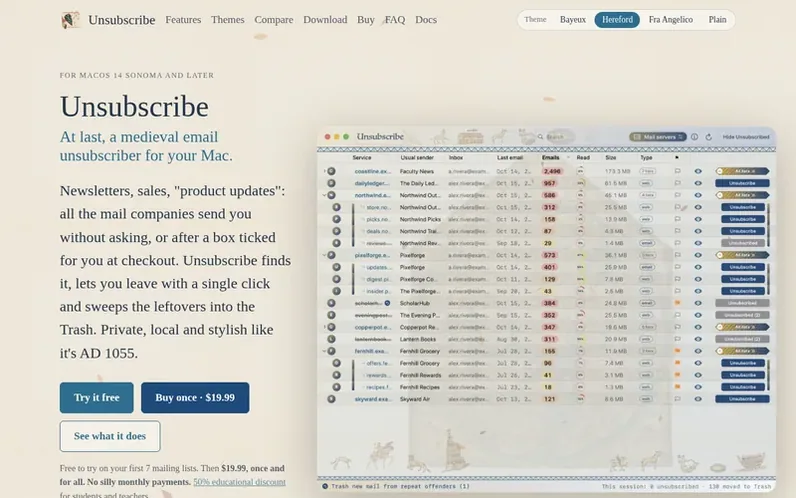
A look at unsubscribeapp.dev
Unsubscribe is a utility for macOS that scans your mailbox to find all newsletters, promotional emails, and other unsolicited mail with unsubscribe links. It displays every mailing list in a table showing sender details, how many emails they sent, and how many you read.
The app lets you unsubscribe with one click—either opening the sender's unsubscribe page in your browser or drafting an unsubscribe email in Apple Mail. It then moves all their emails to Trash in batches with a progress bar. You can clear mail completely or keep recent emails, and optionally archive instead of trashing.
Unsubscribe tracks repeat offenders—senders who mail again after you unsubscribe—and remembers your history of unsubscriptions and deletions by day, week or month. It operates entirely locally on your Mac with no account, no cloud storage, and no tracking, built only on Apple's native macOS code.
Feature notes
- Scan mailbox and list all mailing lists with unsubscribe links
- Unsubscribe with one click via web page or email
- Bulk delete emails by sender with progress tracking
- View how much mail you actually read from each sender
- Keep recent emails or archive instead of deleting
- Track repeat offenders who mail after unsubscribe
- Handle whole domains at once with striped lever
- View unsubscribe history by day, week or month
- Background unsubscribing for one-click lists
- Search and sort emails by sender, count, read percentage and date
Pricing
Pricing model: Free trial
Free trial for first 7 mailing lists, then $19.99 one-time purchase. 50% educational discount for students and teachers.
Compare and explore
FAQ
- Does Unsubscribe read or store my emails?
- No. Unsubscribe operates entirely locally on your Mac with no account, no cloud storage, and no access to your emails. Everything stays between you and your mail provider.
- What happens when I delete emails?
- Emails move to Mail's Trash, never straight to oblivion. Deletes match each email by Message-ID so nothing else from the same address is touched, like receipts or password resets. You can preview what an address sends before you decide.
- What are repeat offenders?
- Repeat offenders are senders who write again after you unsubscribe or who sign you up again at the next checkout. They get a flag, and you can move everything they sent since you unsubscribed to Trash, or click to slide them off if you signed up on purpose.
- Can I keep recent emails instead of deleting everything?
- Yes. You can clear a sender's mail completely, or only delete what is older than a week, a month, three months or a year. You can send it to Trash or to your account's Archive if you want to keep a copy out of sight.
- How does background unsubscribing work?
- Lists that support one-click unsubscribing are handled without opening anything. Turn on background unsubscribing in Settings and the rest are done unseen too—pages are loaded and emails sent through Apple Mail for you.
Leave a review for Unsubscribe
No reviews of Unsubscribe yet. Run the first inspection.
Reviews are free and are never paid for. Open the reviews
Reviews and notes · Change log · Share the profile · Maker of this product? Claim the profile · Report a fault
Unsubscribe has a free listing. The owner can unlock the full profile with a paid launch for $5:
- Founder story (locked)
- Milestones (locked)
- Demo video (locked)
- Dofollow website link: not on this free listing (its website link is nofollow)
Comparable tools
- MailBrewDR 4 · 0 community votes
- TopSMSDR 6 · 0 community votes
- DoveDR 27 · 0 community votes
- Cendro by OakboxDR 0 · 0 community votes