Productivity & Personal Tools
Donna
Mac meeting recorder with on-device transcripts, summaries and follow-up drafts
A Mac assistant that opens meetings on time, records them locally without a bot joining, and automatically generates transcripts with speaker labels, summaries
Overview
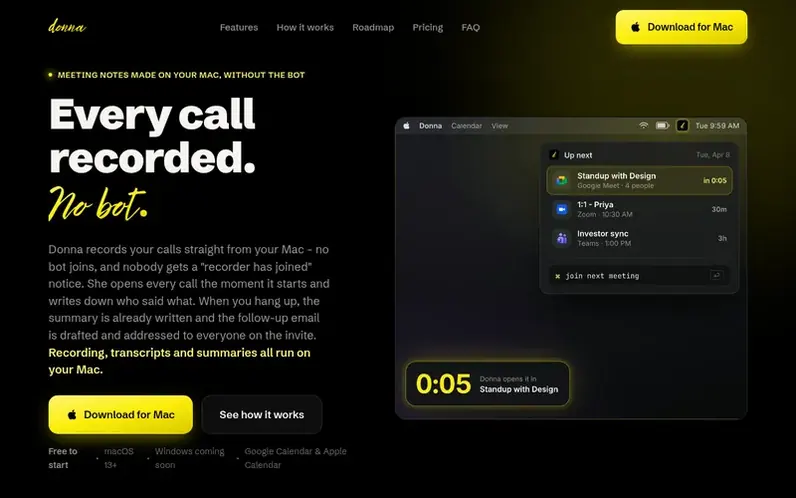
A look at usedonna.io
Donna is a Mac menu-bar assistant for meetings. She opens every call on time in the right app, records it locally—including ad-hoc calls never on your calendar—and writes an on-device transcript labeled by speaker, with no bot joining the room and nothing uploaded to the cloud.
The app automatically generates meeting summaries covering what was discussed, key points, decisions, and action items with owners. One click turns the summary into a follow-up email, addressed to all attendees and ready to send from Gmail or Apple Mail.
Donna can answer questions about past meetings from their transcripts, perform on-device speaker identification that learns voices across meetings, and includes a private AI chat that runs locally. All recording, transcription, speaker matching, and summarization happen on your Mac.
Feature notes
- Auto-opens meetings at start time in the correct app
- Live and polished transcripts with speaker labels learned from voice identification
- Screen recording synced with audio and transcript
- Private on-device AI chat that reads and edits files
- Custom commands and hotkeys for shortcuts and reminders
Pricing
Pricing model: Freemium
Free plan: includes auto-open, next-up list, meeting nudges, RSVP, commands, reminders, and on-device AI chat. Pro: $8 per month (billed monthly) or $80 per year (2 months free). Early subscribers lock in founder pricing for life.
Compare and explore
FAQ
- What is Donna?
- Donna is a Mac menu-bar assistant for meetings. She opens every call on time in the right app, records it locally—including ad-hoc calls that were never on your calendar—and writes an on-device transcript labeled by speaker. No bot joins the room and nothing is uploaded.
- Does Donna summarize my meetings?
- Yes, automatically. Once the transcript settles after a call, Donna writes the summary on her own—what the meeting was about, the key points, the decisions, and every action item with its owner—using a local model, right on your Mac.
- Where does my data live?
- On your Mac, full stop. Recording, transcription (Whisper), speaker matching, and summaries all run on-device—audio and transcripts never leave your machine. You can auto-delete old audio on a schedule you pick.
- What does the free plan actually include?
- Everything around your calendar—auto-open, next-up, meeting nudges, RSVP, commands, and reminders—plus Donna's on-device AI chat. No trial, no expiry. If showing up on time is all you need, you never have to pay.
- Can I record a Zoom or Teams meeting without a bot joining?
- Yes - that is the point of Donna. She captures your mic and the call audio straight from your Mac, so nothing appears in the participant list and no one gets a "recording bot has joined" notice. It works in Zoom, Meet, Teams, Slack huddles, FaceTime, Discord and Webex.
Leave a review for Donna
No reviews of Donna yet. Run the first inspection.
Reviews are free and are never paid for. Open the reviews
Reviews and notes · Change log · Share the profile · Maker of this product? Claim the profile · Report a fault
Donna has a free listing. The owner can unlock the full profile with a paid launch for $5:
- Founder story (locked)
- Milestones (locked)
- Demo video (locked)
- Dofollow website link: not on this free listing (its website link is nofollow)
Comparable tools
- TodoalDR 6 · 2 community votes
- WhiiteroomDR 4 · 1 community vote
- CuewakeDR 21 · 0 community votes
- ReadableResumeDR 62 · 0 community votes