
Time tracking
DayReplay™
Automatic time tracking that reconstructs your workday from app and browser activity without screenshots, keylogging, or cloud sync
Local-first automatic time tracking for Windows and macOS that captures app and browser activity every 5 seconds, rebuilds your workday into sessions, and
Overview
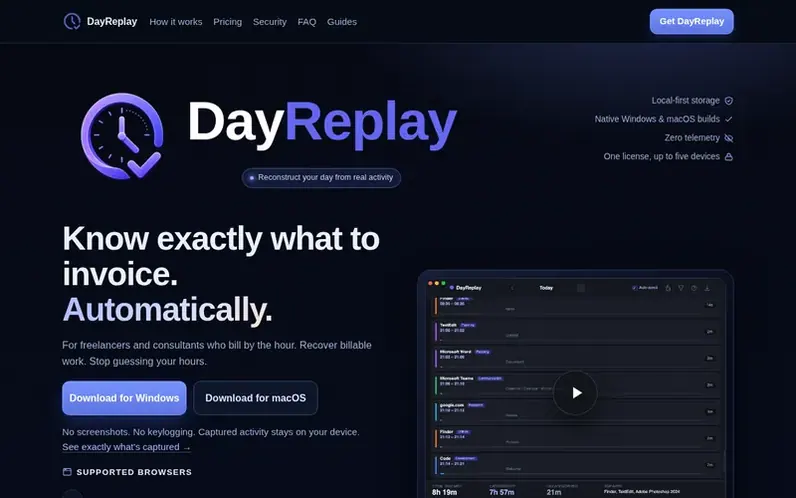
A look at dayreplay.app
DayReplay™ is automatic time tracking software for Windows and macOS designed for freelancers and consultants who bill by the hour. It passively captures the active application, window title, and browser tab context every 5 seconds without requiring manual timer operation. The captured data is automatically reconstructed into practical sessions grouped by domain and process, showing what you did and when you did it. Each session includes the application name, URL, tab titles, and automatically-assigned categories (Development, Communication, Planning, Research, Media, Utilities). Sessions can be reviewed at end-of-day and exported to CSV with start time, end time, duration, application, domain, and category information.
The Free tier provides 7 days of history, day navigation, granular detected categories, read-only access to built-in category rules, and CSV export within that 7-day window. Pro adds unlimited history, custom categories and colors, editable category rules for domain and process mapping, and CSV export of any historical date range.
DayReplay™ is built on local-first principles: all captured activity is stored in a SQLite database on your device with daily backups, no screenshots are taken, no keystrokes are recorded, and no captured data leaves your device. The only network calls are update checks and license validation through Lemon Squeezy. The app runs natively on Windows 10/11 (x64) and macOS 13+ (Apple Silicon), with the same license key activating on up to five devices across both platforms.
Feature notes
- 5-second passive activity capture of foreground app, window title, and browser tab
- Automatic session grouping with 90-second gap threshold
- URL and tab context for browser activity
- Automatic categorization (Development, Communication, Planning, Research, Media, Utilities)
- CSV export with start, end, duration, application, domain, and category per session
- Local SQLite database with daily backups, no cloud sync
- Idle detection: time away from keyboard not counted
- License activation with 7-day offline grace window
- One license works on Windows and macOS, up to 5 devices
Pricing
Pricing model: Freemium
Free: 7-day history, timeline replay, day navigation, built-in category rules (read-only), CSV export within 7-day window, diagnostics panel. Pro: $9/month (cancel any time), includes everything in Free plus unlimited history, custom categories & colors, editable category rules, CSV export of full h
Compare and explore
FAQ
- Is DayReplay™ safe to install given the Windows SmartScreen warning?
- Yes, the SmartScreen warning is a reputation alert for newly-signed software, not a security threat. The DayReplay™ MSI is Authenticode-signed by Zaahr Inc. via Azure Trusted Signing. You can install by clicking More info → Run anyway, or avoid the warning entirely by installing from the Microsoft Store. You can independently verify the binary using Authenticode signature checks, VirusTotal, or SHA-256 hash verification against the published release manifest.
- How do I install DayReplay™ on macOS?
- Download the .dmg file from the homepage (macOS 13 Ventura or newer on Apple Silicon only; Intel Macs are not supported). Open the .dmg, drag DayReplay™ to the Applications folder, then launch it. macOS will prompt for your admin password to copy the app and ask for Accessibility permission on first launch. The app runs in the menu bar (no dock icon) and auto-starts at login.
- Where is my captured activity data stored?
- All captured activity is stored in a local SQLite database on your device (Windows: %LocalAppData%\DayReplay™\dayreplay.db; macOS: ~/Library/Application Support/DayReplay™/dayreplay.db) with daily local backups. The data never leaves your device. The only outbound network calls are update checks and—on Pro—license validation through Lemon Squeezy.
- What happens if I lose internet connection while using DayReplay™ Pro?
- DayReplay™ has a 7-day offline grace window that keeps Pro features available during travel or intermittent connectivity. The app verifies your license with Lemon Squeezy on activation and revalidates at most once every 24 hours; if the network is unavailable, the cached license state is trusted for up to 7 days.
- Does DayReplay™ record screenshots or keystrokes?
- No. DayReplay™ does not take screenshots or record keystrokes. It only captures the foreground application name, window title, and—for supported browsers—the active tab's URL and other open tab titles. Idle time (5+ minutes without keyboard or mouse input) is not counted, though videos and calls are still counted.
Leave a review for DayReplay™
No reviews of DayReplay™ yet. Run the first inspection.
Reviews are free and are never paid for. Open the reviews
Reviews and notes · Change log · Share the profile · Maker of this product? Claim the profile · Report a fault
DayReplay™ has a free listing. The owner can unlock the full profile with a paid launch for $5:
- Founder story (locked)
- Milestones (locked)
- Demo video (locked)
- Dofollow website link (locked)