Mac & desktop utilities
TinyOwl
Local-first image compression for Apple Silicon Macs with reusable workflows
Desktop app for macOS that compresses and resizes images locally on your Mac, with optional upload to your own cloud storage bucket.
Overview
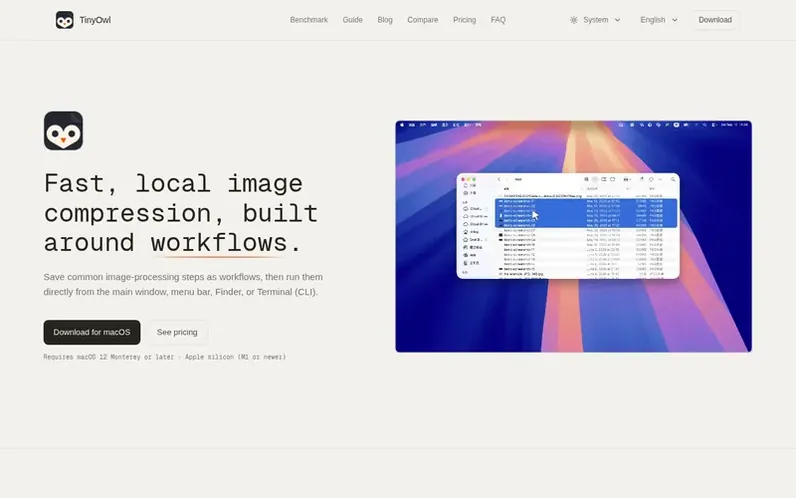
A look at tinyowl.app
TinyOwl is a local-first image compression and workflow tool for Apple Silicon Macs. It lets you resize, compress, and convert images directly on your machine without uploading to external servers. The app supports batch processing through reusable workflows that combine steps like resize, compression, format conversion, and optional uploads to your own cloud storage (R2, S3, OSS, COS, MinIO, or S3-compatible buckets). You can trigger workflows from the clipboard, Finder, menu bar, or Terminal command line. Compression runs entirely on your Mac; any uploads send only the finished output to storage you control with your own credentials.
Feature notes
- Local compression without uploading to external servers
- Reusable workflow presets for batch processing
- Support for PNG, JPG, JPEG, WebP, BMP, TIFF, and AVIF formats
- Paste from clipboard, Finder, or Terminal integration
- Optional upload to R2, S3, OSS, COS, MinIO, or S3-compatible buckets
- Command-line tool with JSON output and stable exit codes
- Headless command-line processing without GUI window
- Compression quality presets including Balanced Q75
- Dry-run mode for preview before processing
- Activation on up to 2 Macs per license
Pricing
Pricing model: Paid
Early-bird one-time license: $9. Regular one-time license: $15. Includes 7-day free trial, lifetime updates including major versions, activation on up to 2 Macs, and 7-day no-reason refund window.
Compare and explore
FAQ
- Which Macs does TinyOwl support?
- TinyOwl requires macOS 12 Monterey or later and a Mac with Apple silicon (M1 or newer). Intel Macs are not currently supported.
- Is TinyOwl local-first?
- Yes. Resize and compression run on your Mac. A compress-only workflow never needs a network connection for the image files themselves.
- Is there a subscription or ongoing fees?
- No. TinyOwl is a one-time license with no monthly or annual fee. Compression runs on your Mac and optional uploads go to a bucket you already have, so there is no ongoing per-user hosting cost to cover with a subscription.
- Can I try TinyOwl before buying?
- Yes. TinyOwl includes a 7-day free trial so you can test local compression, resize, presets, workflows, and uploads before purchasing.
- Do you upload my files to TinyOwl's servers?
- No. TinyOwl does not host your images. Compression stays local. If a workflow includes an upload step, only the finished output is sent to the R2, S3, OSS, COS, MinIO, or other bucket you configured with your own credentials.
Leave a review for TinyOwl
No reviews of TinyOwl yet. Run the first inspection.
Reviews are free and are never paid for. Open the reviews
Reviews and notes · Change log · Share the profile · Maker of this product? Claim the profile · Report a fault
TinyOwl has a free listing. The owner can unlock the full profile with a paid launch for $5:
- Founder story (locked)
- Milestones (locked)
- Demo video (locked)
- Dofollow website link (locked)
Comparable tools
- KakuchiDR 0 · 0 community votes
- Window HintsDR 8 · 0 community votes
- MacZentraDR 2 · 0 community votes
- DiskInsightDR 1 · 0 community votes