Mac & desktop utilities
Tegaro
Ten Mac tools in one menu-bar icon
A Mac utility that combines ten tools—keyboard layout fixing, dictation, clipboard history, screenshots, displays, power monitoring, disk analysis, sound
Overview
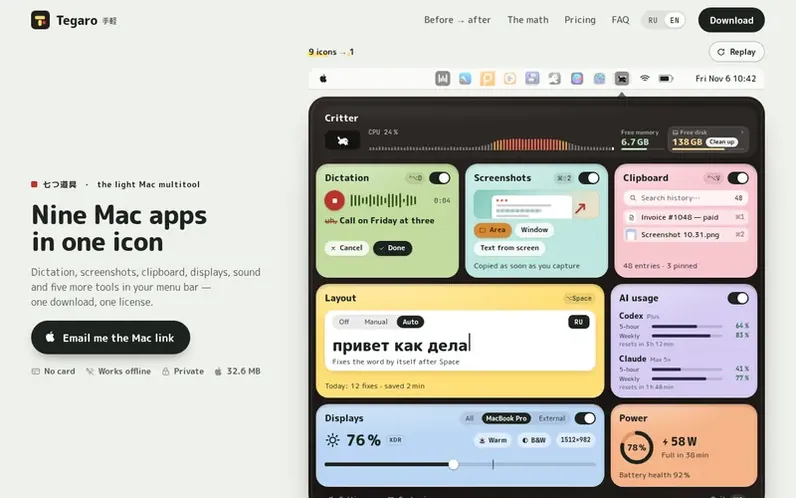
A look at tegaro.app
Tegaro is a macOS utility that consolidates ten commonly used tools into a single menu-bar icon. It includes keyboard layout fixing with automatic corrections, speech-to-text dictation that works locally on the Mac, clipboard history with searchable entries, screenshot capture with automatic copying, external display brightness control, battery and power monitoring, disk space analysis with cleanup capabilities, sound control, AI usage limit tracking for services like Claude and Codex, and a system activity indicator. The application works primarily offline, requires no account, and is available for macOS 13 or newer on both Apple Silicon and Intel Macs. It offers a free tier with limited features and a Pro subscription that unlocks all tools without restrictions.
Feature notes
- Keyboard layout fixing with automatic corrections
- Speech-to-text dictation running locally on Mac
- Searchable clipboard history
- Screenshot capture with automatic copying
- External display brightness control
- Battery and power monitoring
- Disk space analysis and cleanup
- AI usage limits tracking for Claude and Codex
- System activity indicator (Critter)
- Works offline except for AI limits
Pricing
Pricing model: Freemium
Free (14-day trial, then limited free tier): Displays, Power, Sound, Mac load panel, AI usage tracking, Disk analysis, Classic/Cat/Dog Critter, 100 automatic Layout fixes per month, 2,000 words per week Dictation. Monthly Pro: $1.99 first month, then $4.99/month. Yearly Pro: $29.99/year. Lifetime: $
Compare and explore
FAQ
- Will Tegaro slow down my Mac?
- Tegaro is a single app replacing ten separate applications, and you can disable any tools you don't need, minimizing performance impact.
- What happens after the 14-day free trial?
- After the trial, Displays, Power, Sound, the Mac load panel, AI usage, and Disk analysis remain free. Layout is limited to 100 automatic fixes per calendar month with unlimited manual fixes, and Dictation is limited to 2,000 words per Monday-starting week. Clipboard, Screenshots, Disk cleanup, app removal, most Critters, and high-brightness EDR require Pro. Nothing is deleted, and a license immediately removes all limits without requiring a card upfront.
- How do refunds work?
- Cancelling a subscription stops future renewals but does not issue a refund. For a website purchase, email support@tegaro.app with your purchase email and order ID. Read the full refund terms for details on mandatory consumer rights.
- Where does the name Tegaro come from?
- Tegaro comes from the Japanese word 手軽 (tegaru), meaning easy and right at hand. The toolkit is inspired by the Japanese concept 七つ道具 (nanatsu-dōgu, or 'seven tools')—a kit of essential tools you always carry with you.
Leave a review for Tegaro
No reviews of Tegaro yet. Run the first inspection.
Reviews are free and are never paid for. Open the reviews
Reviews and notes · Change log · Share the profile · Maker of this product? Claim the profile · Report a fault
Tegaro has a free listing. The owner can unlock the full profile with a paid launch for $5:
- Founder story (locked)
- Milestones (locked)
- Demo video (locked)
- Dofollow website link (locked)
Comparable tools
- KakuchiDR 0 · 0 community votes
- Window HintsDR 8 · 0 community votes
- MacZentraDR 2 · 0 community votes
- DiskInsightDR 1 · 0 community votes