Mac & desktop utilities
lumabar
Smart dock for Windows 11 and 10 with 100+ live widgets that work together
A widget dock that replaces the Windows taskbar with live widgets for calendar, AI limits, revenue, weather and system stats. One-time purchase, no
Overview
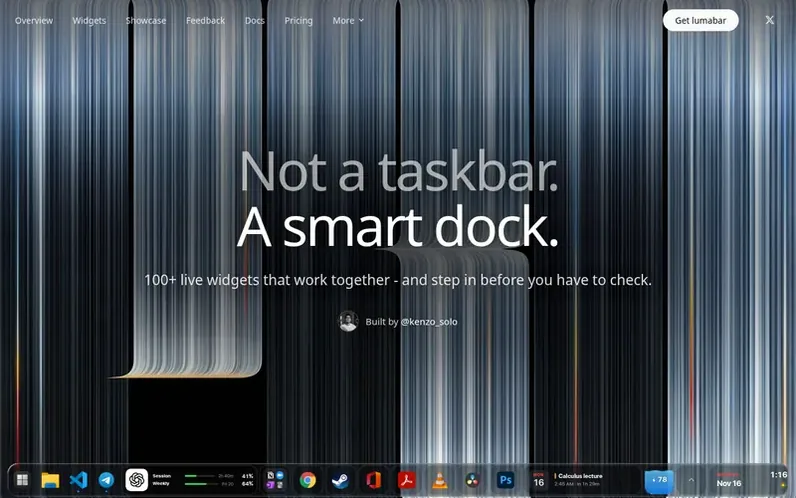
A look at lumabar.xyz
lumabar is a widget dock for Windows 11 and 10 that replaces the taskbar with a customizable bar on the top or bottom edge of the screen. It displays over 100 live widgets including calendar, weather, music player, system stats, AI usage limits, and revenue tracking from services like Stripe and Polar. The widgets share data intelligently—for example, the dock pauses music before a meeting or warns before AI limits run out. The app runs locally with no account required, no server, and no telemetry. It is built in Rust and React, requires no administrator rights, and changes no Windows files. A one-time purchase of $5.99 includes all future updates and a 14-day money-back guarantee.
Feature notes
- 100+ live widgets for calendar, weather, music, system stats, revenue, and AI limits
- Integration with Google Calendar, Outlook, and iCloud
- AI limit monitoring for Claude, ChatGPT, Gemini, Cursor, and others
- Smart automations that pause music before meetings or warn before AI limits run out
- Customizable bar position at top or bottom with six style options
- Calendar reads from iCal links every 15 minutes
- Runs on Windows 10 and 11 in 64-bit and 32-bit versions
- No account, no telemetry, all automations run locally
Pricing
Pricing model: Paid
$5.99 once, lifetime license with all updates included. 14-day money-back guarantee.
Compare and explore
FAQ
- What makes it a smart dock?
- The widgets share data with each other, so your calendar knows your meetings and renewals, and AI tiles track your limits. The dock can pause music before a meeting, warn before AI limits run out, or ask if you still need a subscription before it renews. Each automation can be toggled on or off in Settings.
- Can I connect Google Calendar, Outlook or iCloud?
- Yes. You paste the calendar's secret iCal link into the Calendar card under Calendars. lumabar reads it every 15 minutes, read-only, and the link stays on your PC.
- How much is it, and is there a subscription?
- There is no subscription. It costs $5.99 as a one-time purchase for a lifetime license key, and every update is included.
- What data leaves my PC?
- Very little data leaves your PC and nothing goes to lumabar. There is no account, no lumabar server, and no telemetry. Your layout, todos, notes, calendar links, and automations stay on your PC. Only the license check and the widgets you enable go online, each connecting straight to its own service.
- Can I get a refund?
- Yes. lumabar includes a 14-day money-back guarantee. If it is not right for you within 14 days, email hello@lumabar.xyz from the address you bought with, and the full payment is refunded through Polar with no questions asked.
Leave a review for lumabar
No reviews of lumabar yet. Run the first inspection.
Reviews are free and are never paid for. Open the reviews
Reviews and notes · Change log · Share the profile · Maker of this product? Claim the profile · Report a fault
lumabar has a free listing. The owner can unlock the full profile with a paid launch for $5:
- Founder story (locked)
- Milestones (locked)
- Demo video (locked)
- Dofollow website link: not on this free listing (its website link is nofollow)
Comparable tools
- DProjectsDR 25 · 1 community vote
- JustDoczDR 0 · 0 community votes
- ToolboxDR 8 · 0 community votes
- ScanMyDiskDR 2 · 0 community votes