Notes & knowledge
KeepFlash
AI knowledge library for saved research
KeepFlash saves webpages, PDFs, videos, files, and notes in one searchable library with annotations, topic organization, and AI answers linked to sources.
Overview
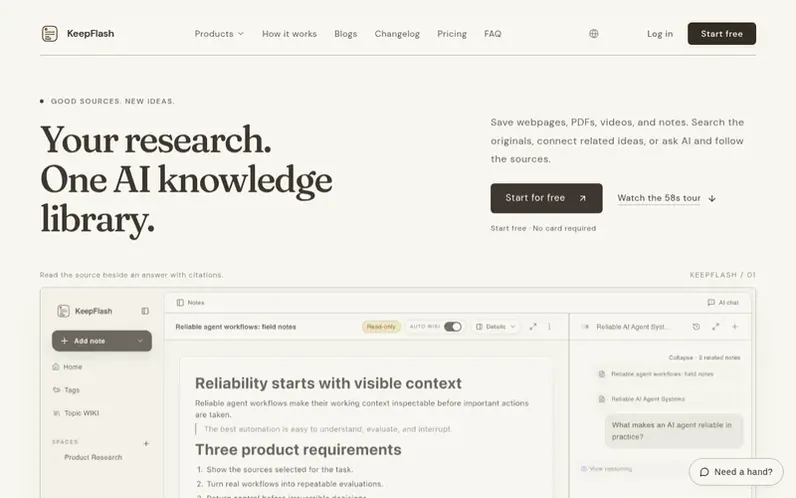
A look at keepflash.com
KeepFlash is an AI-powered knowledge management tool that consolidates research from multiple sources into one searchable library. Users can save webpages, PDFs, YouTube videos, files, and notes, then search across this content, annotate materials, and organize related items into Topic Pages. The platform uses AI to suggest tags, enable semantic search, and answer questions with citations back to the original sources. Features include a browser extension for one-click saving, PDF annotations, video note capture, and integration with AI agents through MCP protocol for read-only access to the library.
Feature notes
- Save webpages, PDFs, YouTube videos, files, and notes
- Full-text search across saved content
- Semantic search by meaning
- PDF annotations and highlighting
- AI-assisted tagging
- Topic Pages from related notes
- Ask questions with source citations
- Browser extension for one-click saving
- Block editor for notes
- Agent access via MCP protocol
Pricing
Pricing model: Freemium
Free: $0 with 150 notes, 2 spaces, 500MB storage. Plus: $6.58/month (billed yearly) with unlimited notes, 10 spaces, 10GB storage. Pro: $12.42/month (billed yearly) with unlimited spaces, 50GB storage.
Compare and explore
FAQ
- What is an AI bookmark manager?
- An AI bookmark manager saves online sources and uses AI-assisted processing to make them easier to organize and retrieve. KeepFlash keeps source content with the bookmark, suggests tags, supports full-text search, and lets you ask questions using selected saved material as context.
- Does KeepFlash only save webpages?
- No. KeepFlash supports webpages, PDFs, YouTube video notes, files, images, and block-based notes, so related material can stay in the same library.
- Can I try the AI bookmark manager for free?
- Yes. The free plan includes 150 notes, two spaces, PDF annotations, YouTube video notes, 200 KeepFlash credits per month, and up to three Topic Pages. No payment card is required to start.
- Which browsers support the KeepFlash browser extension?
- The live Chrome extension is available now for saving the page you are reading in one click. Firefox, Edge, and Safari options appear in KeepFlash download controls as each store listing becomes available.
- Can I switch plans later?
- Yes. You can upgrade whenever you need more space, smarter search, or higher AI limits.
Leave a review for KeepFlash
No reviews of KeepFlash yet. Run the first inspection.
Reviews are free and are never paid for. Open the reviews
Reviews and notes · Change log · Share the profile · Maker of this product? Claim the profile · Report a fault
KeepFlash has a free listing. The owner can unlock the full profile with a paid launch for $5:
- Founder story (locked)
- Milestones (locked)
- Demo video (locked)
- Dofollow website link (locked)
Comparable tools
- BrainstreamDR 6 · 0 community votes
- EinkoDR 2 · 0 community votes
- AcresDR 20 · 0 community votes
- ReteumDR 0 · 0 community votes