Video & meetings
CamLooper
Free fake webcam software for Zoom, Teams, OBS and Discord
Free, ad-supported software that loops any video file as a virtual camera in Zoom, Teams, OBS and Discord on Windows and Linux.
Overview
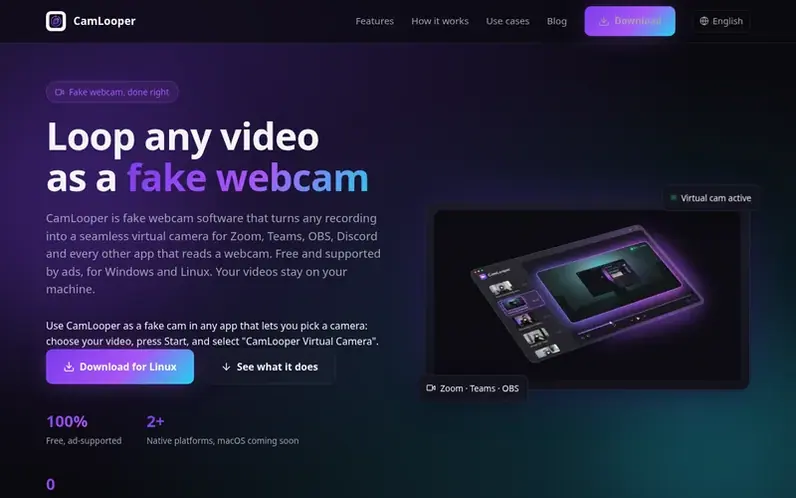
A look at camlooper.com
CamLooper is free fake webcam software that creates a virtual camera device on your computer and fills it with a looping video file. The software works with Zoom, Teams, Google Meet, Discord, OBS Studio and any other application that accepts a webcam input. You can drag in any common video format (MP4, MOV, MKV, WebM, AVI, M4V), set looping and quality preferences, then select CamLooper Virtual Camera as your webcam in your meeting or streaming app. All processing runs locally on your machine using FFmpeg—your video files never leave your computer, there are no accounts, and no telemetry is collected on what you play. The app is supported by ads: a banner at the top of the app window and an ad page that opens in your browser at most once every 6 hours. CamLooper is free for personal and noncommercial use under PolyForm Noncommercial 1.0.0 licensing; commercial use requires a paid license.
Feature notes
- Loop any video format as a virtual camera
- Registers as a real webcam device compatible with all major apps
- All processing runs locally on your computer
- Works with Zoom, Teams, Google Meet, Discord, OBS and more
- Record clips directly in the app or import existing videos
- Advanced panel with performance metrics and debug logs
Pricing
Pricing model: Free
Free for personal and noncommercial use; commercial use requires a paid license (contact hello@camlooper.com for pricing).
Compare and explore
FAQ
- Is CamLooper really free?
- Yes, CamLooper costs nothing and is supported by ads: a banner at the top of the app window and an ad page that opens in your browser at most once every 6 hours. The ads never receive your videos. CamLooper is licensed under PolyForm Noncommercial 1.0.0 and is free for personal and noncommercial use, including schools and charities. Commercial use requires a paid license.
- Do my videos get uploaded anywhere?
- No. All processing runs locally on your computer using FFmpeg. Video files never leave your machine, there are no accounts, and there is no telemetry on the content you play.
- Is a fake webcam safe to use or against Zoom's rules?
- The software itself is safe: a fake webcam simply registers as a camera device on your computer, using the same mechanism as OBS's virtual camera. Zoom, Teams and Discord all allow virtual cameras and they are widely used for overlays and pre-recorded content. However, be upfront with the people on your call and do not use it to impersonate someone or to get around identity checks such as proctored exams or KYC verification.
- What video formats can I loop?
- You can loop MP4, MOV, WebM, MKV, AVI and M4V video files. Other formats, including image files, are not accepted. For the smoothest result use a clip whose resolution and frame rate match what your meeting app expects, such as 1280×720 at 30fps.
- Is there a Mac version?
- Not yet. macOS is coming soon: the build is waiting on Apple notarization. It will be posted on the download page when it's ready.
Leave a review for CamLooper
No reviews of CamLooper yet. Run the first inspection.
Reviews are free and are never paid for. Open the reviews
Reviews and notes · Change log · Share the profile · Maker of this product? Claim the profile · Report a fault
CamLooper has a free listing. The owner can unlock the full profile with a paid launch for $5:
- Founder story (locked)
- Milestones (locked)
- Demo video (locked)
- Dofollow website link (locked)