
Developer Tools
BURSU Connection Manager
Cross-platform remote connection manager for SSH, WinRM, RDP, VNC, AppleRD and more protocols
Free connection manager for SSH, RDP, VNC, WinRM, AppleRD and other protocols across Windows, macOS, Linux, Android and iOS with encrypted credentials vault and
Overview
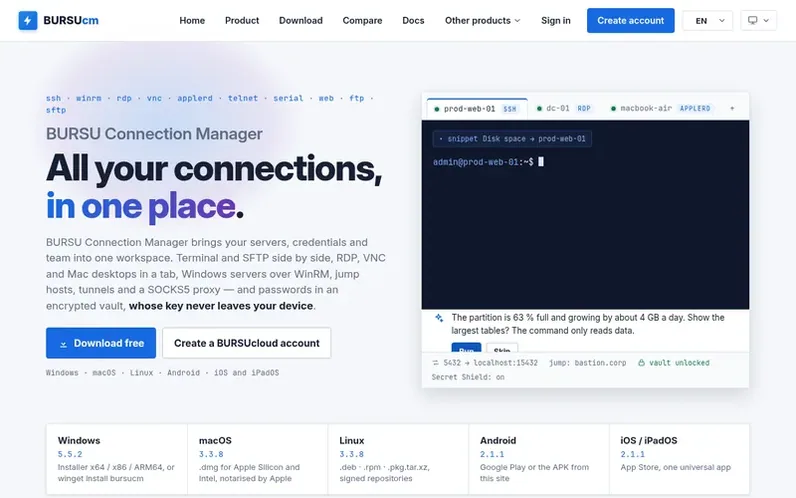
A look at bursucm.com
BURSU Connection Manager is a cross-platform remote connection manager supporting SSH, WinRM, RDP, VNC, AppleRD, Telnet, Serial, Web, FTP and SFTP protocols. It runs on Windows, macOS and Linux desktops with companion Android and iOS apps, all accessing the same encrypted catalog. The application features a built-in terminal, SFTP file manager, remote desktop viewing, jump hosts and tunnels, tmux session support, split-view terminals, command snippets, and an optional AI assistant. Credentials are protected by AES-256-GCM encryption or Windows DPAPI, and data can be synced through BURSUcloud's zero-knowledge PostgreSQL backend or stored locally.
Feature notes
- SSH with full interactive terminal
- RDP with built-in H.264 engine and multi-monitor support
- AppleRD for Macs with GPU-decoded video on Apple silicon
- WinRM for Windows servers via PowerShell Remoting or WinRS
- Jump hosts and port forwarding with ProxyJump chains
- SFTP file manager with two-pane view and transfer queue
- AES-256-GCM encrypted credential vault
- Optional AI assistant with local model or API key support
- Team access control with per-folder permissions
- BURSUcloud sync with zero-knowledge PostgreSQL backend
Pricing
Pricing model: Free
Compare and explore
FAQ
- What is BURSU Connection Manager?
- BURSU Connection Manager is a cross-platform remote connection manager supporting SSH, WinRM, RDP, VNC, AppleRD, Telnet, Serial, Web, FTP and SFTP protocols, running on Windows, macOS and Linux with companion Android and iPad apps that access the same encrypted catalog. It includes an embedded terminal, SFTP file panel and remote desktop viewing.
- Which protocols are supported?
- BURSU Connection Manager supports SSH, WinRM, RDP, VNC, AppleRD, Telnet, Serial, Web, FTP and SFTP. RDP and VNC both run inside a tab through built-in engines, with RDP also supporting RD Gateway. AppleRD brings a Mac's screen into a tab with Apple's High Performance video and audio.
- How are credentials protected?
- Passwords and SSH keys are protected by a portable AES-256-GCM master-password vault or Windows DPAPI on Windows. The master password never leaves your device and the vault encrypts everything before it is sent to the cloud.
- Does it support jump hosts and port forwarding?
- Yes. An SSH connection can go through one or more jump hosts (ProxyJump), with the host key verified against the real target — the terminal and the SFTP panel both work through the tunnel. Each connection can also open local (-L), remote (-R) and dynamic (-D, a SOCKS5 proxy) tunnels automatically, and keys can come from the OpenSSH agent or from an SSH-key credential in the vault.
- Does it work with Windows servers?
- Yes. Besides RDP, a WinRM connection opens PowerShell (over PowerShell Remoting) or cmd.exe (over WinRS) on a Windows server as a terminal tab — on HTTP or HTTPS, with the server's certificate trusted once and pinned like an SSH host key. Output streams as it is produced, Ctrl+C stops the pipeline, and prompts such as Read-Host or -Confirm wait for your answer.
Leave a review for BURSU Connection Manager
No reviews of BURSU Connection Manager yet. Run the first inspection.
Reviews are free and are never paid for. Open the reviews
Reviews and notes · Change log · Share the profile · Maker of this product? Claim the profile · Report a fault
BURSU Connection Manager has a free listing. The owner can unlock the full profile with a paid launch for $5:
- Founder story (locked)
- Milestones (locked)
- Demo video (locked)
- Dofollow website link (locked)
Comparable tools
- AnalogDR 70 · 0 community votes
- PHP Upgrade Risk AuditDR 2 · 0 community votes
- OnyxDR 2 · 0 community votes
- graftforkDR 0 · 0 community votes