
Privacy tools
My Rabbit Hat
An encrypted vault for iPhone that keeps files behind a pattern only you know, with everything encrypted on the device
My Rabbit Hat is an encrypted vault app for iOS that stores photos, video, audio and documents behind a pattern, with all encryption happening on-device and no
Overview
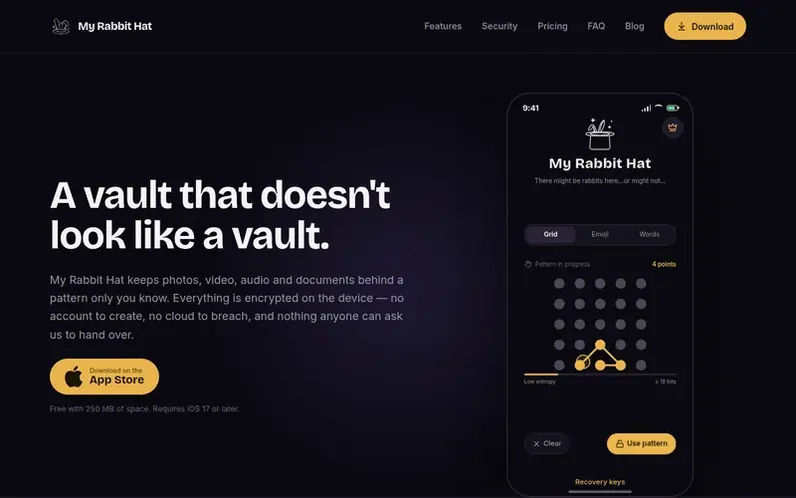
A look at myrabbithat.com
My Rabbit Hat is an encrypted vault app for iOS that keeps photos, video, audio and documents behind a pattern only you know. Everything is encrypted on the device with no account to create, no cloud to breach, and nothing anyone can ask the company to hand over.
The app features nested vaults, destruction patterns that wipe contents instead of unlocking them, and concealed previews so sensitive items show nothing at all. It requires iOS 17 or later and is accessible through the App Store.
The encryption design means the company cannot reset a forgotten pattern or recover files. Users receive a recovery key at setup that must be saved separately, as it is the only way to regain access if the pattern is forgotten.
Feature notes
- Pattern-based unlocking with grid trails, emoji sequences, or colored characters
- Nested vaults with independent patterns for each level
- Destruction patterns that wipe contents instead of unlocking
- Concealed item-level previews and thumbnails
- Recovery keys for pattern recovery
- Live entropy meter for pattern strength
- No account or cloud storage required
- No network calls or telemetry
Pricing
Free forever with 250 MB of space. Subscription options: Weekly $2.99 per week, Monthly $9.99 per month ($2.30 per week), Annual $49.99 per year ($0.96 per week). Lifetime: $99.99 for one payment with no renewals and includes every future release.
Compare and explore
FAQ
- Can you recover my files if I forget the pattern?
- No. The key is derived from your pattern on the device and never reaches the company, so there is nothing on their side to reset. Users must save the recovery key provided at setup, as it is the only way to regain access.
- What happens if someone forces me to open it?
- Users can set a destruction pattern that wipes the contents instead of unlocking them. When entered, the app opens looking exactly as empty as before, securely destroying the files.
- Is anything uploaded or backed up?
- Nothing. The app makes no network calls to the company. This also means an iPhone backup will not carry the vault, so a lost device means a lost vault unless files are exported first.
- How is this different from a hidden album or a locked notes folder?
- My Rabbit Hat holds nested vaults, destruction patterns and concealed previews, and gives no indication of how much is inside, unlike standard hidden or locked features that visually signal something is hidden.
- Why should I trust a small app with this?
- The encryption is standard, the app is offline by design, and the security page documents exactly what is stored and where. Users should verify the implementation before committing anything irreplaceable.
Leave a review for My Rabbit Hat
No reviews of My Rabbit Hat yet. Run the first inspection.
Reviews are free and are never paid for. Open the reviews
Reviews and notes · Change log · Share the profile · Maker of this product? Claim the profile · Report a fault
My Rabbit Hat has a free listing. The owner can unlock the full profile with a paid launch for $5:
- Founder story (locked)
- Milestones (locked)
- Demo video (locked)
- Dofollow website link (locked)
Comparable tools
- Temp MailDR 63 · 0 community votes
- TrickyBirdDR 3 · 0 community votes
- AnonyViewDR 14 · 0 community votes
- DogeSMSDR 29 · 0 community votes