
Diagrams & whiteboards
Mermaid Online
Free online Mermaid editor with live preview and watermark-free export to PNG, SVG, JPG, WebP, or PDF
A free browser-based Mermaid diagram editor that lets you write, preview, and export diagrams in multiple formats without signup or watermarks.
Overview
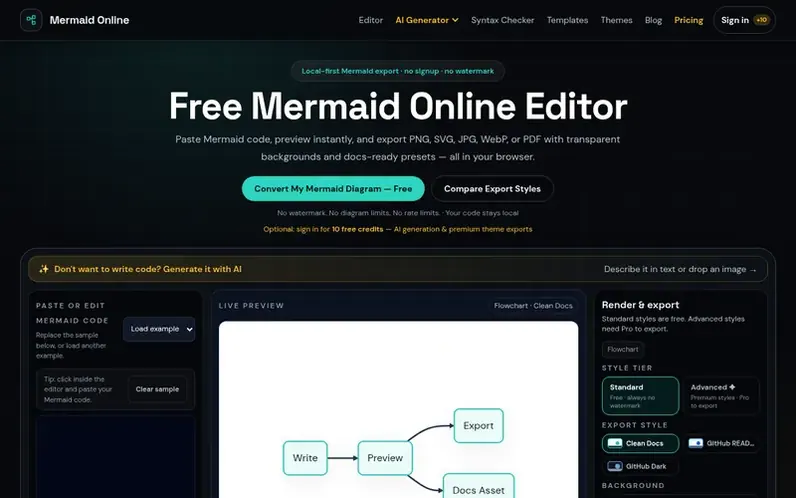
A look at mermaidonline.org
Mermaid Online is a free web application for editing and exporting Mermaid diagrams. Write or paste Mermaid code into the editor with syntax highlighting and live preview, then download your diagram as PNG, SVG, JPG, WebP, or PDF at up to 4x resolution with transparent backgrounds and no watermark. The tool includes hand-tuned export themes, optional AI features for diagram generation and syntax repair, and an interactive system maps feature. All core editing and export functions run locally in your browser without uploading diagram code, though optional AI features use a third-party AI provider. The service offers a free tier with unlimited exports and 10 free AI credits after sign-in, plus an optional Pro subscription at $5.99/month for 200 monthly AI credits and premium theme exports.
Feature notes
- Syntax highlighting and error markers with autosave
- Live preview as you edit
- Export to PNG, SVG, JPG, WebP, and PDF
- Transparent background export for PNG and WebP
- 1x, 2x, and 4x resolution scaling
- AI diagram generation from text description
- AI syntax repair and code fixing
- 9 hand-tuned export themes including Editorial and Whiteboard styles
- Interactive system maps from diagrams
- Local browser rendering without uploading code
Pricing
Pricing model: Freemium
Free: PNG, SVG, JPG, WebP, and PDF export with no watermark, up to 4x scale, transparent backgrounds, 3 standard export themes, 10 free AI credits after sign-in, 3 saved cloud diagrams. Pro: $5.99/mo with 200 AI credits every month, unlimited cloud diagrams, all 7 premium theme exports. Credit packs
Compare and explore
FAQ
- Does my Mermaid code get uploaded to servers?
- No. The core editor and export workflow run entirely in your browser. Mermaid code is processed locally and never uploaded to the server. Optional AI features are the exception: they send your prompt to Zhipu AI's GLM-5.3-Flash model.
- Can I export diagrams with a transparent background?
- Yes. Choose Transparent in the export style settings and download as PNG or WebP. This works with every export style and is useful for slides, dark documentation, and design tools.
- What resolution scales are available for export?
- The free tool supports 1x, 2x, and 4x image and PDF export scales. You can see the exact pixel dimensions before downloading, and higher scales may be added later for Pro workflows if browser memory allows.
- Is Mermaid Online affiliated with Mermaid.js or Mermaid Chart?
- No. Mermaid Online is an independent tool built on top of the open-source Mermaid project and is not affiliated with Mermaid.js, Mermaid Chart, or their maintainers.
- Is this Mermaid to PNG converter free?
- Yes. The core tool lets you export PNG, JPG, WebP, SVG, and PDF without signup or watermark. Future paid features may focus on batch workflows, API access, or advanced export automation.
Leave a review for Mermaid Online
No reviews of Mermaid Online yet. Run the first inspection.
Reviews are free and are never paid for. Open the reviews
Reviews and notes · Change log · Share the profile · Maker of this product? Claim the profile · Report a fault
Mermaid Online has a free listing. The owner can unlock the full profile with a paid launch for $5:
- Founder story (locked)
- Milestones (locked)
- Demo video (locked)
- Dofollow website link (locked)
Comparable tools
- ArialineDR 5 · 0 community votes